

Definition Prepaid expenses are those expenses whose payments are done in advance which can be for the goods or services whose benefit will accrue in the subsequent accounting period. A prepaid expense is a current asset. prepaid expenses are classified under the head current assets in the balance sRead more
Definition
Prepaid expenses are those expenses whose payments are done in advance which can be for the goods or services whose benefit will accrue in the subsequent accounting period.
A prepaid expense is a current asset. prepaid expenses are classified under the head current assets in the balance sheet.
This is because they provide future economic benefits to the company. As such, they are assets that can be used to generate revenue in the future.
For example prepaid rent, prepaid insurance, etc.
Current assets are defined as cash and other assets that are expected to be converted into cash or consumed in the production of goods or rendering of services in the normal course of business.
Or in other words, we can say that the expected realization period is less than the operating cycle period although it is more than the period of 12 months from the date of the balance sheet.
For example, goods are purchased with the purpose to resell and earn a profit, debtors exist to convert them into cash i.e., receive the amount from them, bills receivable exist again for receiving cash against it, etc.
Current liabilities are liabilities that are payable generally within 12 months from the end of the accounting period or in other words which fall due for payment in a relatively short period.
For example bills payable, short-term loans, etc.
Why current assets and not a current liability?
Now let me try to explain to you that prepaid expenses are classified as current assets and not as a current liability which is as follows :
-
- we can say that the expected realization period is less than the operating cycle period although it is more than the period of 12 months from the date of the balance sheet.
-
- expected to be converted into cash or consumed in the production of goods or rendering of services in the normal course of business.
-
- In the business prepaid expense are treated as an asset which we can see on the asset side of the balance sheet.
-
- Or in other words, we can say that it is initially recorded as a prepaid expense as an asset in the balance sheet and subsequently its value is expensed over time in the profit and loss account.
Example
Now let us take an example for explaining prepaid expenses which are mentioned below.
An insurance premium of Rs 50000 has been paid for one year beginning (previous year). The financial year ends on 31st march YYYY.
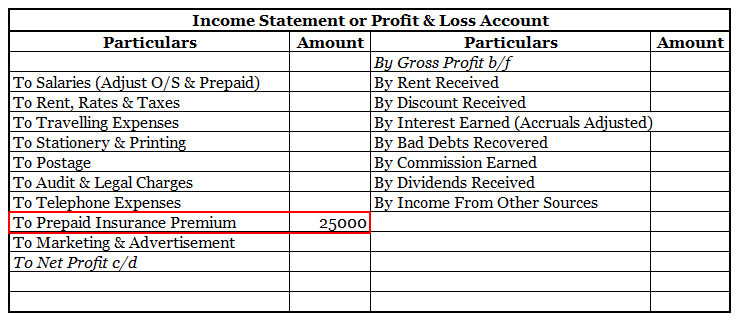
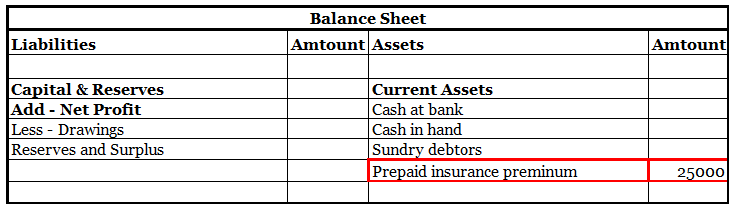
It means the premium for 6 months i.e., 1st April, YYYY(current year) to 30th September, YYYY(current year) amounting to Rs 25000 is paid in advance.
Thus, of premium paid in advance (Rs 25000) is a Prepaid Expense. It will be accounted as an expense in the financial year ending 31st march next year. In the balance sheet as of 31st march YYYY ( current year ) it will be shown as Current Asset.
Here is an extract of the profit /loss account and balance sheet of the above example:
Key points
There are a few things to keep in mind when dealing with prepaid expenses.
- First, is that the expenses are actually prepaid. This means that the expenses were paid for before they were used.
- Second, it is essential to track the number of prepaid expenses that have been used. That is to make sure that the prepaid expenses are not overstated on the company’s financial statements. This can happen if the company pays for more goods or services than it actually
- Last but not least it is important to keep in mind that changes in the value of prepaid expenses can impact the company’s net income. For example, if the company’s prepaid insurance increases in value, this will increase the company’s net income.
See less


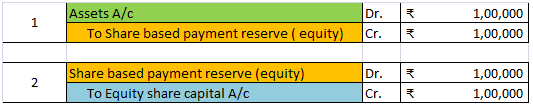






GST stand for Goods and Services Tax which is levied on almost all the good and services supplied in India. Generally, a business is required to charge GST on all the goods and services supplied by it if its turnover is over the limit as prescribed by respective GST laws. We can also do accounting fRead more
GST stand for Goods and Services Tax which is levied on almost all the good and services supplied in India. Generally, a business is required to charge GST on all the goods and services supplied by it if its turnover is over the limit as prescribed by respective GST laws.
We can also do accounting for GST in Tally by enabling it from the company features.
The steps to enable GST and perform GST accounting in Tally are as given below.
Enabling GST in Tally
GST can be enabled in Tally from the ‘Company features’ menu which opens just after the creation of a company. There is an option called ‘Enable Goods and Services Tax (GST)’. You have to enter ‘Yes’.
If the company is already created and the GST was not enabled earlier, then just press F11 and select the company for which you want to enable GST. The ‘company features’ menu will open again, from there you have to enter ‘Yes’ beside the ‘Enable Goods and Services Tax (GST)’ option.
In both cases, this menu will open:
Do have look at the details I have filled in. You have to:
These settings are enough if you are to just practice GST in Tally.
See less