

A Bank Reconciliation Statement is prepared to know the causes for the difference between 2. the balance as per bank column of cash book and passbook. This is because transactions in Cash Book are recorded from the point of view of the business and the Bank Statement/Pass Book is prepared from the pRead more
A Bank Reconciliation Statement is prepared to know the causes for the difference between 2. the balance as per bank column of cash book and passbook.
This is because transactions in Cash Book are recorded from the point of view of the business and the Bank Statement/Pass Book is prepared from the point of view of the banker. Since both are prepared from a different point of view, differences are bound to occur.
Bank Reconciliation is the process by which on a particular date the bank balance as per Cash Book is reconciled with the balance as per Pass Book/Bank Statement.
Whenever bank reconciliation is done, we need to identify the reasons or transactions causing the differences between both balances. Then a statement highlighting the reasons or causes of differences is prepared. This statement is known as Bank Reconciliation Statement.
A Bank Reconciliation Statement is prepared by starting with either the (a) bank balance as per Cash Book or the (b) balance as per Pass Book/Bank Statement. Only those entries which are recorded in the Cash Book but not in the Pass Book/Bank Statement or vice versa are considered while preparing the Bank Reconciliation Statement.
The reasons for the differences between the two balances can be broadly classified into three categories:
- Differences due to timing.
- Transactions recorded by the Bank.
- Errors.
For example, the debit bank balance as per the Cash Book of Mr. A on 31st March is 20,000. On the same date, his Bank Statement showed a credit balance of 30,000. When the Bank Reconciliation Statement is prepared on 31st March, he will find out the transactions causing the 10,000 (30,000 – 20,000) difference between both the balances. Once the transactions are identified he will reconcile the balance as per the Cash Book with the balance as per his Bank Statement.
See less








To begin with, lets us understand what the Companies Act 2013 tells about calls-in-advance, so basically as per section 50 of the companies act 2013 "A company may if so authorized by its articles, accepts from any members the whole or part of amount remaining unpaid on any share held by him, even iRead more
To begin with, lets us understand what the Companies Act 2013 tells about calls-in-advance, so basically as per section 50 of the companies act 2013 “A company may if so authorized by its articles, accepts from any members the whole or part of amount remaining unpaid on any share held by him, even if no amount has been called up”.
To be more precise whenever excess money is received by the company than, what has been called up is known as calls-in-advance.
Accounting Treatment
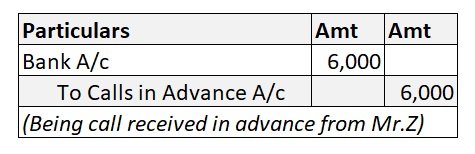
Well, it is to be noted that calls-in-advance is never a part of share capital. A company when authorized by its article can accept those advance amounts and directly credit the amount received to the calls-in-advance account.
As these advance amounts are a liability for the company these are shown under the head current liability of the balance sheet until calls are made and are paid to the shareholders.
Since this is the liability of the company, it is liable to pay the interest amount on such call money from the date of receipt until the payment is done to the shareholders. The rate of interest is mentioned in the articles of association. If the article is silent regarding the rate on which interest is paid then it is assumed to be @6%.
Accounting Entry
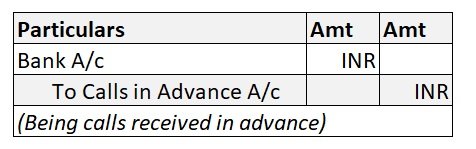
Bonnie let us understand the entries with help of an example
ADIDAS LTD issued 25,000 equity shares of Rs 10 each payable as follows:
ON APPLICATION Rs 5
ON ALLOTMENT Rs 3
ON FINAL CALL Rs 2
Application on 30,000 shares was received. excess money received on the application was refunded immediately. Mr. X who was allotted 1,000 shares paid the call money at the time of allotment and all amounts were duly received assume interest rate @6% for 3 months, so the relevant accounting entry goes as follows:
Important Points to be noted under calls-in-advance as per the companies act 2013
- The shareholder is not entitled to any voting rights on money paid until the said money is called for.
- No dividends are payable on advance money.
- Board may pay interest on advance not exceeding 12%.
- The shareholders are entitled to claim the interest amount as mentioned in the article, if there are no profits, then it must be paid out of capital because shareholders become the creditors of the company.
See less