


Journal entries in the ledger What is a Journal Entry? Journal entry is a form of bookkeeping. All the economic or non-economic transactions in the business are recorded in the journal entries showing a company's debit or credit balances. It is a double-entry accounting method and requires at leastRead more
Journal entries in the ledger
What is a Journal Entry?
Journal entry is a form of bookkeeping. All the economic or non-economic transactions in the business are recorded in the journal entries showing a company’s debit or credit balances. It is a double-entry accounting method and requires at least two accounts or more in a transaction.
The journal entry helps to identify the transactions. We use journals to get a running list of business transactions. Each journal entry provides this specific information about a transaction:
- Date of the transaction.
- Accounts involved in it.
- Payer, payee, receiver, etc.
- Account name.
- Debit and credit of money.
General Ledger
After the transactions are recorded in the journal, they are posted in the principal book called ‘Ledger’. A ledger account contains information about a specific account. It contains the opening balance as well as the closing balances of an account. It summarizes the business transactions.
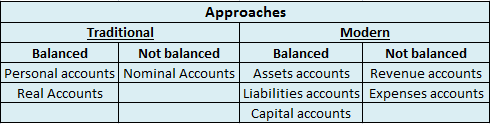
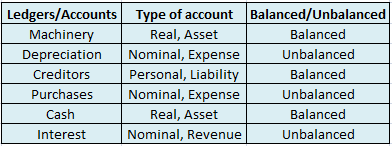
Transferring the entries from journals to respective ledger accounts is called ledger posting or posting to the ledger accounts. Balancing of ledgers is carried out to find differences at the year’s end, it means finding the difference between the debit and credit amounts of a particular account.
For instance,
Suppose goods were bought for cash. While passing the journal entry, we’ll be debiting the purchases a/c and crediting the cash a/c by stating it as, ‘To Cash A/c’.
Now, this entry will be affecting both the purchases account and the cash account. In the cash account, we’ll be debiting purchases. Whereas in the purchases account, we’ll be crediting the cash. That’s how it works in the double-entry bookkeeping system of accounting.
Example
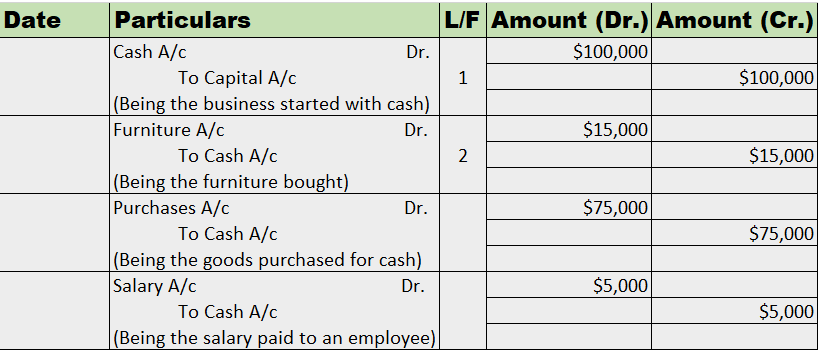
Mr. Tony Stark started the business with cash of $100,000. He bought furniture for business for $15,000. He further purchased goods for $75,000. He hired an employee and paid him a salary of $5,000.
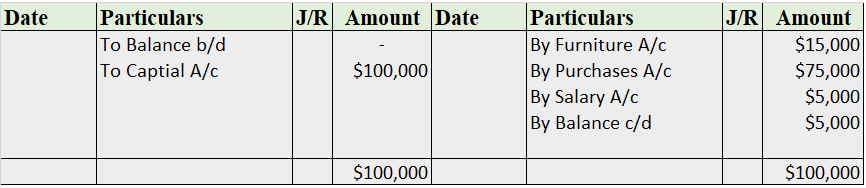
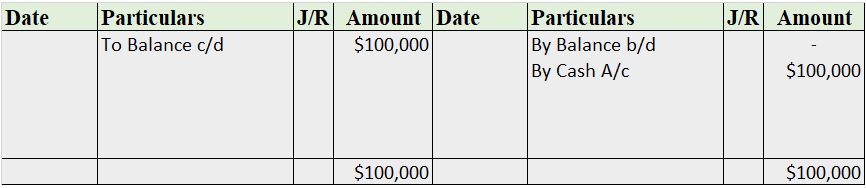
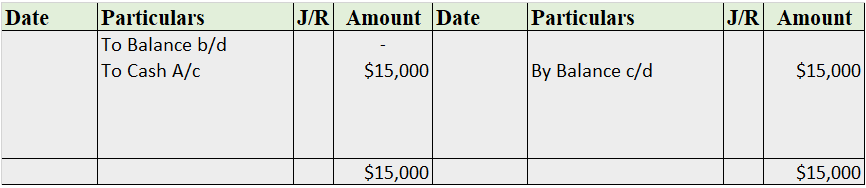
Now, we’ll be journalizing the transactions and posting them into the ledger accounts.
Journal Entries
Recording into Ledger Account
Cash A/c
Capital A/c
Furniture A/c
Purchases A/c
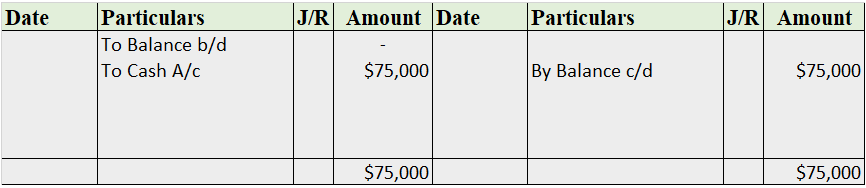
Salary A/c
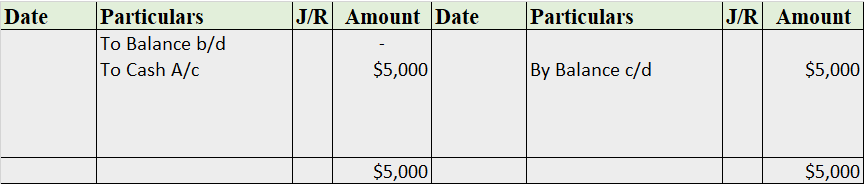
Note: The balance b/d is not applicable as this is the business’ commencement year.
See less











Changing a Ledger name in Tally is an easy process. The requirement of changing the name of a ledger may arise in three situations: Situation 1: When we need to change a ledger's name, right after its creation while being in the ledger creation menu Situation 2: When we realize the need to change aRead more
Changing a Ledger name in Tally is an easy process. The requirement of changing the name of a ledger may arise in three situations:
In Tally, there are plenty of shortcut keys that can ease the way we work on it. My methods will be based on such shortcuts on Tally ERP 9.0.
Situation 1
Often just after ledger creation, we realize that we have made mistake in entering the name of the ledger.
Many opt to choose this long path to alter the ledger’s name.
Exiting Voucher creation menu → Gateway of Tally menu → Accounts Info → Ledger option → Alter option → Select the ledger → Ledger alteration window opens.
Instead of it, you can choose to use Page Up key while on the ledger creation window. Press the Page-up key till you reach that ledger. Then you can edit its name or any other details.
Pressing the page up key automatically opens the ledger alteration mode and lets the user scroll through the ledgers available.
The ledger alteration window looks like this:
Situation 2
Sometimes, while performing entries into vouchers, we feel the need to alter a ledger’s name.
This can be done by pressing Ctrl + Enter key with the cursor on the ledger’s name in the voucher creation menu.
On pressing Ctrl + Enter Key, the ledger alteration window will open, from where the user can alter the ledger name or any other details.
Situation 3
When the user is not either on the voucher creation menu or on the ledger creation menu, then the ledger’s name has to be altered by going through the following steps:
Gateway of Tally menu → Accounts Info → Ledger option → Alter option → Select the required ledger → ledger alteration window opens.
That’s it. These are different approaches to changing a ledger’s name.
One thing that is common among all approaches is the opening of the Ledger alteration window at the end. Hence, it is only through the Ledger alteration window we can change a ledger’s details including its name.
See less